Showing posts with label Bible. Show all posts

Thursday, August 02, 2007

iGoogle Gadget: Verse-a-week Memorization


I'm a big fan of iGoogle. I've tried Google Reader, but I seem to always come back to iGoogle. One Google gadget that I have added recently is called Verse-a-week Memorization. It helps you memorize one verse for the entire week by covering up some of the words each day. The goal is by the end of the week you will know the verse by memory. For those of you who rely on iGoogle this could be a huge help for you to be more productive in memorizing Scripture

"Learn a new verse every week, words are hidden on a scheduled time so that by the end of the week, the entire verse is hidden. Verses rotate every week or you can pick your own verse."

Saturday, July 14, 2007

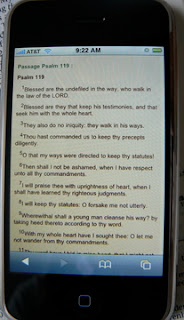
Reading the Bible on your iPhone


One of the drawbacks to no installable iPhone programs is you have to find what you want on the web. Now, thankfully, you can find a lot of useful sites on the web. Finding a website that you can read the Bible on your iPhone is not easy. I have already emailed eBible requesting that they add a way for iPhone users to read the Bible online. Unfortunately, they have not seen many iPhone users surfing their site, so it doesn't make a good investment for them. Antoine over at Mobile Ministry Magazine has suggested this site. However, I prefer to use the King James version for reading my Bible. So I'll share with you what I have done to enable me to read the Scriptures on my iPhone.

Step 1 - From your Mac or PC computer, go to http://bibleresources.bible.com/

Step 2 - In the middle of the webpage you will see "Access Bible" and underneath that you will see "Read the Bible." Click on "Read the Bible."

Step 3 - On the next window, select your preferred version of the Bible or your country's language. I choose the King James version, but they also have Amplified Bible, Bible in Basic English, New International Version, New King James Version, New Living Translation, and Young's Literal Translation just to name a few.

Step 4 - Once you have chosen your version of the Bible and/or language, bookmark the page in Safari or Internet Explorer. I named my bookmark "Online Bible KJV".

Step 5 - Sync your iPhone to your computer. Make sure you have chosen to sync bookmarks with Safari or Internet Explorer. To enable syncing of bookmarks, make sure your iPhone is connected. If iTunes is not open, open iTunes. In the left column, click on your iPhone. In the middle of iTunes and underneath the Apple logo is the tab, "Info". Click on info and scroll down a bit. Make sure the box is checked next to "Sync my bookmarks with..."

Step 6 - On your iPhone, tap on Safari and then tap on the bookmark icon. Find your bookmark and tap on it. Your Online Bible will show up and you can double tap to zoom in on the Books along with their chapters. Once you have chosen your book and chapter, you can double tap on the text and it will fit really nice onto your iPhone's screen.

Conclusion:

It's not a perfect setup. You cannot choose a chapter and verse. So if you load Psalm 119 and you want verse 121, you will have a lot of flicking to do. Also there are some ads and what not around the books of the Bible and the chapters, however they are minimal and do not seem to affect the load times too much. It has been the best way I have found to read the version of the Bible that I want. If you have a better way, please share it below. If you have an iPhone go and visit, eBible and others such sites to help encourage them to develop a page specifically design for the iPhone. You might also want to send them an email as well.

Monday, July 02, 2007

Downloadable Bible studies from Back to the Bible.


If you are in need of Bible studies for your family devotions, Sunday school, school classes, etc., you might want to check out Back to the Bible's collection of Bible studies. Each study can be easily downloaded at no cost to you. They are PDF documents so will need Adobe Reader or my favorite, Foxit PDF reader, to view them. These studies work great in a group or as an individual. I'm looking at these for my teenagers as devotional ideas for them.
The lessons are listed below for you to see their titles. If you would like to go to the download page, please follow this link.

Bible Reading Helps
Understanding Your Bible

Books of the Bible
Galatians

Christian Living
Making the Most of Your Christian Life

David
Lessons On Living From David

Heaven
Heaven, How Do I Get There?

New Believers
A Life That's Real
Meeting God Changes Your Life
It's All About Who You Know
Now What, Living Out Your Christian Faith
No Guesswork, Living to Please God

Passion for Christ Series
Lessons One through Four

Tuesday, March 06, 2007

Tips for Scripture memorization

Over the years, my methods for memorizing Scripture have changed. As a child, I eagerly memorized the Word of God and enjoy every minute of it. Towards my teen years, memorizing Scripture was a chore or homework. In college, memorizing Scripture was part of a test or a quiz. Now, it's different. I want to memorize and be able to retain this for a lifetime. Not like college, not like a teenager, but more like I was as a child. Eager to memorize, eager to learn, and many of those verses never left my heart.

Today, I found a site with some tips on memorizing Scripture. As servants in the Lord's ministry, we must be memorizing Scripture so that we can defend ourselves from temptation and give a comforting word to another believer.

This website I found has a few chapters to it, so it is not some quick read. I myself have not yet finished reading the site, but I have picked up a few pointers and tips that should aid in my Scripture memorization. I know many people have their own techniques and if you would like to share please do so, as I'm sure others would appreciate any help and tips.

I know there are a couple Palm programs that allow you to use your PDA or Treo device as a tool to help you memorize Scripture. They are:

Scripture Memory System
This freeware application is based on the Topical Memory System designed by The Navigators. A desktop companion version that allows you to edit the verse database on your computer available for a separate purchase.

MyVerses
by Scott Hansen
A Scripture memory system for Palm OS 4.0 and higher devices with interactive tools, a learning counter, and a personal review schedule to help you regularly practice memory verses.

Memorize! for Palm
Designed to help you memorize scripture, including daily reminders to work on your memory verses. Also works with MyBible.

Lamp Light
A free Scripture memory coach for Palm OS handhelds. Uses a system of daily, weekly, monthly, and yearly reviews to help you remember all verses learned.